Happy hours and promotions
Create pricing rules that change prices automatically on set days and times, and understand which rule wins and when a rule applies to an order.
On this page
Pricing rules change prices by themselves: a happy hour on drinks every weekday from 17:00, 10% off lunch dishes, or buy two coffees and get one free. Staff don't have to remember anything; the till applies the rule when an item is rung up.
Before you start
- Pricing rules are included in every plan. The feature is called Happy hour & pricing rules under Settings › Features.
- You need the Change prices permission. In the back office the page is Promotions.
Create a rule
- In the back office, go to Promotions and select New rule.
- Enter a Name, for example "Happy hour".
- Under Effect, choose the Type and enter its value (see the table below).
- Under Schedule, choose the Days (none means every day), All day or a From and Until time, and optional Starts on and Ends on dates.
- Under Locations, pick where it applies. None means every location.
- Under Applies to, pick Categories and/or Products. None means the whole menu. A rule on a category also covers its sub-categories.
- Set the Priority if rules can overlap (see below).
- Make sure Active is on and save.
Effect types
| Type | What it does | Example |
|---|---|---|
| Percentage off | Takes a percentage off the price (at most 100%). | 50% off cocktails |
| Amount off | Takes a fixed amount off each item, never below 0. | 1.00 off every beer |
| Fixed price | Sells the item for this price. It never raises a price; a variant keeps its price difference on top. | Wine of the day for 5.00 |
| Buy X get Y | For every X + Y items, the cheapest Y are free, across the whole order. | Buy 2, get 1 free |
Times
Times are local time at the location. An end time before the start time runs past midnight, for example 22:00–02:00. Fill in both times or neither.
Which rule wins
Only one rule applies to a product at a time. When several rules match the same product, the rule with the highest Priority wins (from −1000 to 1000). On a tie, the newest rule wins.
Example: "Happy hour, 30% off all drinks" with priority 0, and "House wine for 4.00" with priority 10. During happy hour, house wine sells for 4.00 and every other drink gets 30% off.
When a rule applies
- A rule is checked when the item is added to the order, using the location's time zone. The price is then fixed on that line.
- Lines added before the rule started keep their normal price. Lines added during the rule keep the rule price, even if the order is paid after the rule ends.
- Changing, pausing or deleting a rule only affects items added from then on. Lines already on orders keep their price.
- For a window that runs past midnight, the days and dates refer to the day it starts. A Friday 22:00–02:00 rule still applies at 01:00 on Saturday.
- Rules apply to QR orders and online pickup orders too. Guests see the reduced price on the menu.
Rule status
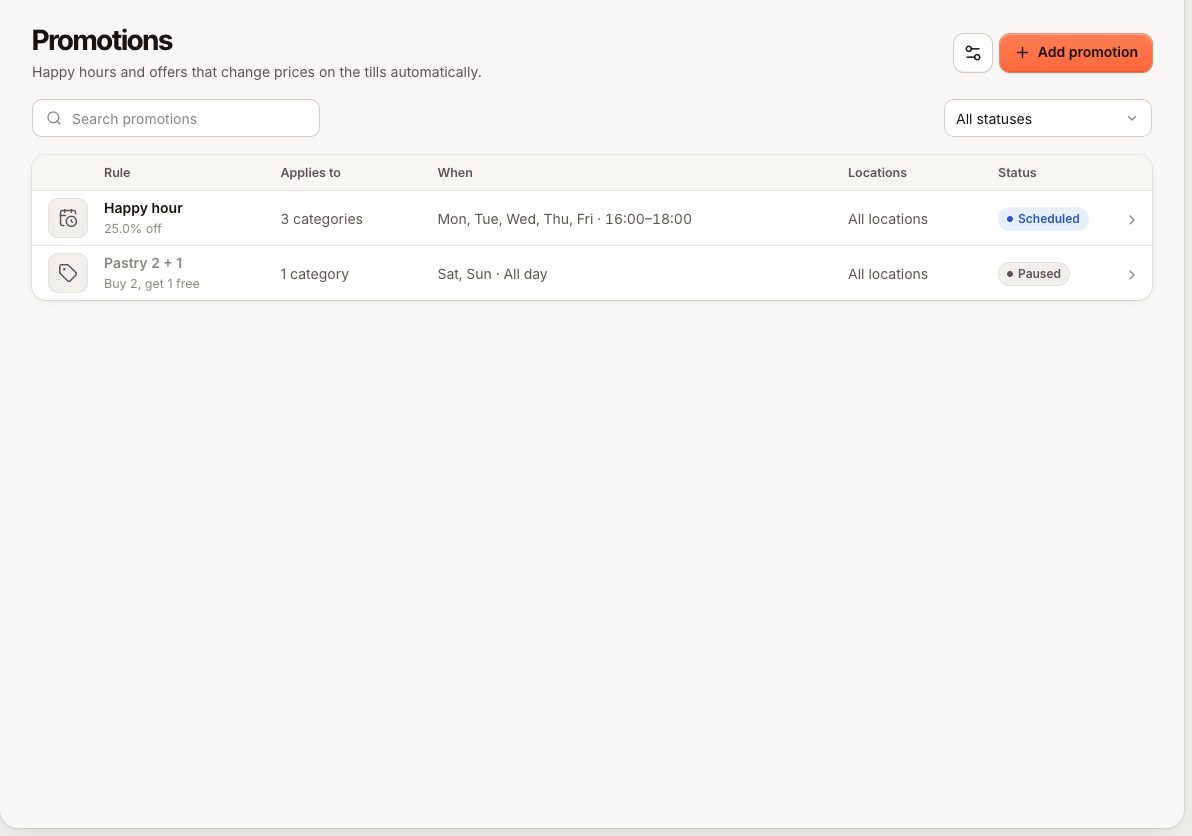
The list shows each rule's status:
| Status | Meaning |
|---|---|
| Running now | The rule changes prices at this moment. |
| Scheduled | Active, but outside its days, times or dates right now. |
| Paused | Active is off. Paused rules never change a price. |
| Ended | The Ends on date has passed. |
Promotions and manual discounts
A pricing rule is automatic. A manual discount is something staff apply on the POS with the Apply discounts permission, for one line or the whole order. See Discounts.
- A Buy X get Y discount can't be removed by hand. Staff see
DISCOUNT_AUTOMATIC("This promotion is applied automatically. Remove the items instead."). - If staff change a line's price by hand, the hand-set price replaces the rule for that line.
Common questions
Why did the promotion not apply?
Work through these checks:
- Is the rule Running now? If it says Scheduled, check the days, times, dates and the location's time zone.
- Was the item added before the rule started? It keeps its normal price. Add the item again to get the rule price.
- Does the rule include this location, and this product or its category?
- Does another rule with a higher priority match the same product?
- For Buy X get Y: are there enough items on the same order? Items sold by weight don't count.
What does PRICING_RULE_INVALID mean?
A field of the rule is missing or wrong. The message names the field to check, for example a value of 0 or an end date before the start date.
Can I limit a promotion to members or to one customer?
No. Rules apply to everyone at the chosen locations. For a single guest, use a manual discount.