Get listed in Knownbee
Fill in your listing, send it to Verimly for review, handle requested changes and choose whether guests can find you in the Knownbee app.
On this page
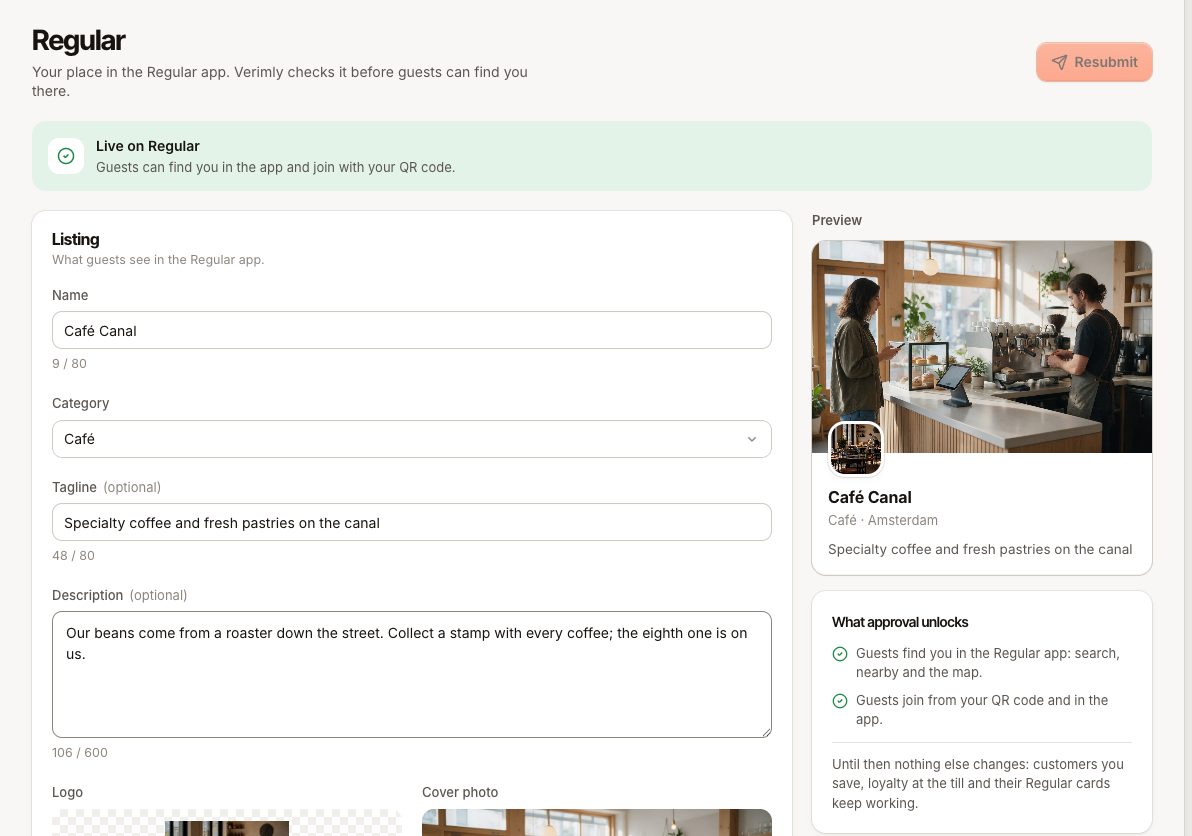
Your listing is how your place appears in the Knownbee app: name, category, logo and photo. Verimly checks every listing before guests can find you in Discover and join from your QR code. Your loyalty programme at the till works whether or not you are listed.
Before you start
- Open Customers › Knownbee in the back office.
- Customers & loyalty must be on. Without it the page shows "Knownbee needs loyalty": guests find and join you in Knownbee only while loyalty is on. Gift cards alone do not list your business.
- View customers lets you see the listing. Editing, submitting and the visibility switch need Manage customers.
What approval unlocks
- Guests find you in the Knownbee app: search, nearby and the map.
- Guests join from your QR code and in the app.
Until then nothing else changes: customers you save, loyalty at the till and their Knownbee cards keep working. Your join QR code shows "not on Knownbee yet" to guests.
Fill in your listing
The form starts from your business name and type and, if you have a website, its logo, cover photo and text.
| Field | Rules |
|---|---|
| Name | Required, up to 80 characters |
| Category | Required, your type of business |
| Tagline | Recommended. One line under your name, up to 80 characters |
| Description | Recommended. A few sentences about your place, up to 600 characters |
| Logo | Required. Square, at least 512 × 512 px |
| Cover photo | Landscape, about 16:10, at least 1600 × 900 px. A real photo of your place, no text or prices on it |
Images must be uploaded as files (JPG, PNG or WebP, up to 10 MB). A linked image cannot be submitted: "This image is a link. Upload the file instead to submit." If an image is too small or the wrong shape, the field says so; crop it and upload again.
The Preview on the right shows how your place looks in the app. Save your work with the save bar at any time.
Submit for review
- Make sure name, category and logo are filled in. Otherwise you see "Add the … to submit."
- Choose Submit for review.
- The status changes to In review. Verimly checks the texts and pictures and emails you when it is approved.
Statuses
| Status | What it means | What to do |
|---|---|---|
| Not on Knownbee yet | Nothing submitted yet | Fill in the listing and submit it |
| In review since … | Verimly is checking it | Wait for the email |
| Changes requested | Verimly needs a change; the note is shown on the page and sent by email | Make the change and choose Resubmit |
| Live on Knownbee | Guests can find you and join with your QR code | Nothing |
| Hidden from Knownbee | Approved but switched off by you | Turn Visible in Knownbee back on |
| Suspended | Verimly took the listing off Knownbee | Reply to Verimly's email to sort it out |
Update a live listing
Edit the fields and choose Resubmit. Your update goes to review while guests keep seeing the approved version. If Verimly asks for changes to the update, the approved version stays live. If nothing changed since the approval, resubmitting is refused ("Nothing changed since the approval.").
Hide your place
Once the listing is live, the In the app card shows Visible in Knownbee. Turn it off to hide your place from search and the map. Members keep their cards and your QR code keeps working. The join QR code itself is also on this card, see Set up loyalty.
Common questions
How long does the review take?
Verimly reviews listings by hand. You get an email when it is approved or when a change is needed.
Can I use a link to my logo?
No. Listing images must be uploads, because a link can change or break after approval.
Does suspension delete my customers?
No. Your place disappears from Knownbee and cannot be joined from the app. Cards already in guests' wallets stay, and loyalty at the till keeps working.
If something goes wrong
| Message | Meaning |
|---|---|
"Add the … first." (REGULAR_LISTING_INCOMPLETE) | A required field is empty |
| "Upload the logo as an image file: square, at least 512 × 512 px." | The logo is a link, too small or not square |
| "Upload the cover photo as an image file: landscape (about 16:10), at least 1600 × 900 px." | The cover is a link, too small or the wrong shape |
| "Verimly suspended this listing. Reply to our email to sort it out." | You cannot submit while suspended |
"This place isn't on Knownbee yet." (REGULAR_NOT_APPROVED) | A guest tried to join before approval |