Read the VAT report
What the VAT report shows for a month or quarter, where the output and input VAT come from, and why it is a summary for your accountant and not a VAT return.
On this page
The VAT report adds up the VAT you charged on sales, subtracts the VAT you paid on supplier invoices, and shows the difference by VAT rate for a month or a quarter. It is made to hand to your accountant. It is not a VAT return, and Verimly does not file anything for you.
Before you start
- You need the VAT overview permission. Owners, managers and the Accountant role have it by default.
- Output VAT works from the first sale. Input VAT only appears if you book supplier invoices in Verimly, see Book a supplier invoice. That needs the Purchasing feature, which is part of Pro.
- Check your VAT rates under Settings › Taxes first. The report groups by the rate saved on each product and purchase line, see VAT rates.
Open the report
- In the back office open Reports, then VAT.
- Open the period list and choose a month (the last 12 are listed under Months) or a quarter (the last 4 under Quarters).
- If you have several locations, choose the one you want in the location menu at the top, or All locations.
The dates of the chosen period show next to the list.
What you see
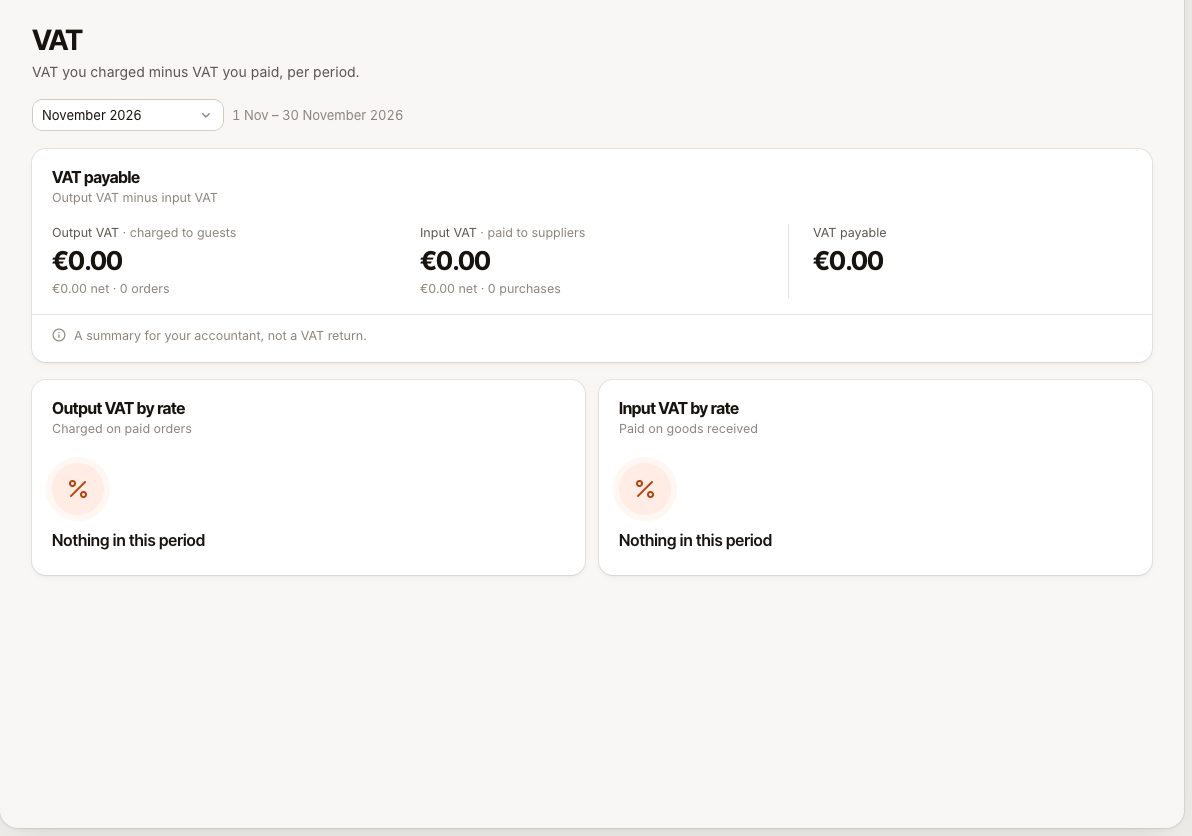
At the top, one line shows the result: Output VAT minus Input VAT equals VAT payable. When the input VAT is higher, it reads VAT reclaimable instead.
| Figure | What it is |
|---|---|
| Output VAT | VAT charged to guests on paid orders, with the net amount and the number of orders. |
| Input VAT | VAT paid to suppliers on purchases you marked as received, with the net amount and the number of purchases. |
| VAT payable or VAT reclaimable | Output minus input. |
Below that, Output VAT by rate and Input VAT by rate each list every rate with Net, VAT and Gross, and a total. A period without records shows Nothing in this period.
How the figures are worked out
Output VAT
- It counts paid orders that closed in the period, and the VAT is taken at the rate of each line after line and order discounts.
- The service charge is part of the sale, so its VAT is included, split over the order's rates in proportion to what was charged at each rate.
- Refunds made in the period give their VAT back, so they reduce output VAT on the day of the refund.
- Tips carry no VAT and are not included.
- Selling a gift card is not a sale for VAT, because a gift card is a voucher. Paying with a gift card is a normal sale and carries VAT.
Input VAT
- It counts purchases with the status received whose supplier invoice date falls in the period, by the VAT rate booked on each purchase line.
- A purchase that is still a draft or is cancelled is not included, and a purchase counts in the period of its invoice date, not the day you entered it.
Calendar days, not business days
The VAT report uses calendar days in your business time zone. The sales reports use business days, which end at the Business day ends at time of each location. A sale between midnight and your cut-off can therefore appear in a different day in each. See Why reports, the till and the bank differ.
What this report is not
- Not a VAT return. The screen says so itself: it is a summary for your accountant. It does not know your VAT scheme, exemptions, reverse charge, or corrections you have agreed with the tax office.
- No export. The VAT report cannot be exported. Copy the figures or share your screen with your accountant. See Export your data to CSV for what can be exported. For the same VAT per day with your ledger codes, see The accounting journal and your ledger codes.
- No filing. Verimly does not submit anything to the tax authority.
Ask your accountant how to use the figures, and which period to report.
Common questions
Why is output VAT different from the VAT line in Reports?
The sales reports follow business days and count refunds on their own day. The VAT report uses calendar days. A period that ends at midnight rather than at your cut-off can give a different total.
Why is input VAT zero?
You have not booked supplier invoices as received in Verimly, or they are dated in another period. Book them under Purchasing, see Book a supplier invoice.
I changed a VAT rate. Does the report change?
Past orders keep the rate they were sold with. New sales use the new rate. Applying a rate to products does not change what has already been sold.
The VAT page is missing
Your role does not include VAT overview. Ask an owner to add it under Staff › Roles & permissions, see Roles and permissions.