Guests can't book online
What to check when your booking page doesn't open, shows no free times, or refuses a booking.
On this page
When guests say they can't book, the cause is nearly always a setting: opening hours, the booking window, party size or capacity. Open your own booking page next to your settings and work through the checks below until the times you expect appear.
Quickest check
- In Reservations, open More › Open booking page.
- Choose the party size and the date the guest wanted.
- Compare with Settings › Reservations and the opening hours under Settings › Locations.
If you see the times but the guest doesn't, they probably used an old link or chose a larger party.
The booking page doesn't open
"Booking page not found"
The link is wrong, or the location's Booking address was changed after the link was shared. Copy the current link from Reservations › More › Copy booking link and update your website and Google listing. It also shows when the location is inactive or none of its online features are on.
"Online booking is not available"
Online booking is off under Settings › Reservations (ONLINE_BOOKING_DISABLED), or Reservations is off at that location. Guests are asked to contact you directly.
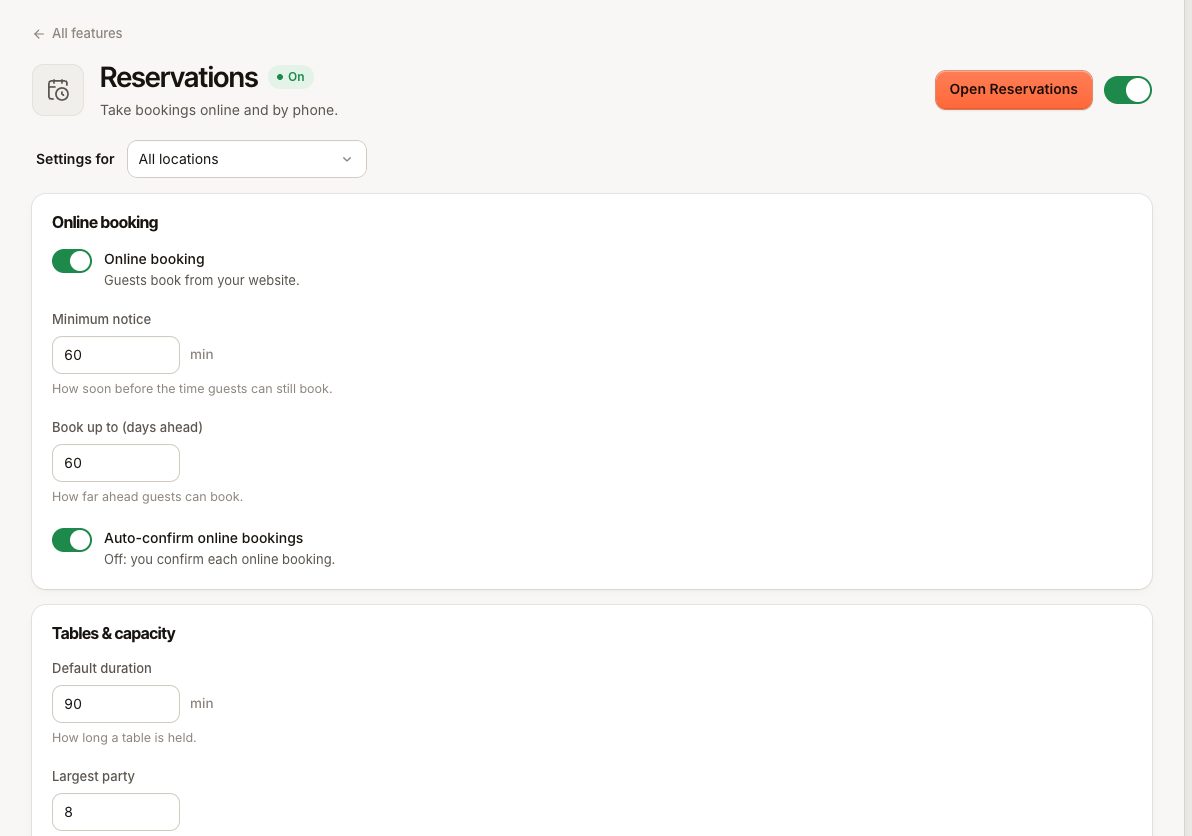
The page stopped working for every location
Check Settings › Plan & billing. If your subscription has been inactive for more than 7 days, booking pages stop taking bookings. See Billing is blocked.
No times are shown
Work through these in order:
- Closed day: the page says "Closed on this day". Check Opening hours for that weekday.
- Too late in the day: a booking must end by closing time. With a 90-minute Default duration and closing at 22:00, the last time is 20:30. Shorten the duration or extend the hours.
- Minimum notice: times sooner than the Minimum notice (60 minutes by default) are hidden, so a guest trying to book for in half an hour sees nothing.
- Too far ahead: dates after Book up to (days ahead) have no times.
- Party size: parties above Largest party can't book online ("More than 8 guests? Please call us.").
- Full: the page says "No free tables on this day. Try another date or fewer guests." - With tables, a time needs one free table with enough seats for the whole duration. Tables are not combined. Also check Reservable online and At least on each table in the floor plan: a table that isn't reservable online, or whose minimum is above the party size, is never offered online. See Floor plan. - Without tables, the guests arriving in that 15-minute slot plus the new party must stay within Guests per time slot.
The booking is refused
| What the guest sees | Why | What to do |
|---|---|---|
"That time was just taken. Please pick another one." (RESERVATION_SLOT_UNAVAILABLE) | Someone else booked the last table a moment earlier | Pick another time |
"You already have 3 upcoming bookings here. Please call us to book more." (RESERVATION_LIMIT_REACHED) | The guest's email or phone already holds Bookings per guest upcoming bookings | Raise the limit, or book it yourself |
"Party size must be between 1 and 8. For bigger groups, please call." (PARTY_SIZE_INVALID) | Above Largest party | Take it by phone |
| "Enter your email address" | No email address left; a phone number alone is not enough, because the code and the booking messages go by email | Enter an email address |
"Confirm your email or phone with a code to finish this booking. Reload the page and try again." (BOOKING_VERIFICATION_REQUIRED) | The guest has the page open from before the code step | Reload the page and book again |
"That code is not right." or "This code has expired. Ask for a new one." (OTP_INVALID, OTP_EXPIRED) | Wrong code, older than 10 minutes, or five wrong tries | The guest taps Send a new code |
"Leave an email address to confirm this booking." (BOOKING_CODE_EMAIL_REQUIRED) | Only a phone number was sent, for example from a page opened before this change | Reload the page and enter an email address, or take the booking yourself |
The guest doesn't get the code
Codes arrive within a minute, by email. Verimly does not send booking codes by text message.
- Ask the guest to check their spam folder and whether the email address was typed correctly. With Change details they can correct it and ask again.
- A guest can ask for five codes per 15 minutes per address, then has to wait. Online booking also has daily limits per connection and per location; when they are reached the page says that no more online bookings are taken today, and guests should call.
- An address that bounced earlier gets no messages from Verimly. Take that booking yourself.
The booking was made but not confirmed
With Auto-confirm online bookings off, the guest sees "Request received" and the booking waits as Booked until you select Confirm in Reservations or on the POS. See Change or cancel a booking.
Staff can't find a time either
In New reservation, staff see the same free times, but can still save a full time: "This time is fully booked — you can still save it." If a table is already taken, saving with that table fails with "Table 4 is already reserved at that time." (RESERVATION_TABLE_CONFLICT); choose another table or leave the table empty.
Still not working?
Contact support with the location, the date, time and party size the guest tried, the booking link they used and a screenshot. See Contact support.