Customer profiles, data export and deletion
What a customer profile holds, how it relates to the guest's own Knownbee account, and how to export or delete a customer's data when they ask.
On this page
A customer profile is your business's record of a guest: contact details, visits, loyalty balance and notes. The guest's Knownbee account is something else: it belongs to the guest, and Verimly runs it. Knowing which is which tells you what you can export or delete, and what only the guest can do.
Before you start
- Customer profiles come with the Customers & loyalty feature. It is part of Pro and Business, and Starter can add it as an add-on. See Turn features on and off.
- View customers lets someone open profiles and balances. Manage customers is needed to add, edit, export or delete a profile and to change marketing consent. Adjust loyalty balances is needed to correct points or stamps.
Your profile and the guest's Knownbee account
| Customer profile (yours) | Knownbee account (the guest's) | |
|---|---|---|
| Who controls it | Your business | The guest |
| Where it lives | Customers in the back office | The Knownbee app |
| What it holds | Name, email, phone, birthday, tags, notes, marketing consent, balance, orders, bookings, gift cards | Their sign-in details and the cards they hold at every place |
| Who can delete it | Someone with Manage customers, or the guest by leaving your place in Knownbee | Only the guest |
Every profile you save is a Knownbee customer from the start. When the guest signs in to Knownbee with the same email or phone, their card appears there, and the profile shows Uses the Knownbee app. Until then it shows Not in the app yet. Your business never sees the guest's other cards or where else they go. See What Knownbee is.
Add or edit a profile
- In the back office, go to Customers and choose New customer.
- Enter a Name and at least an Email or a Phone. The email or phone is how the guest later finds their card in Knownbee.
- Add a Birthday, Tags (separate them with commas) or Notes if useful.
- Save. To change a profile later, open it and choose Edit.
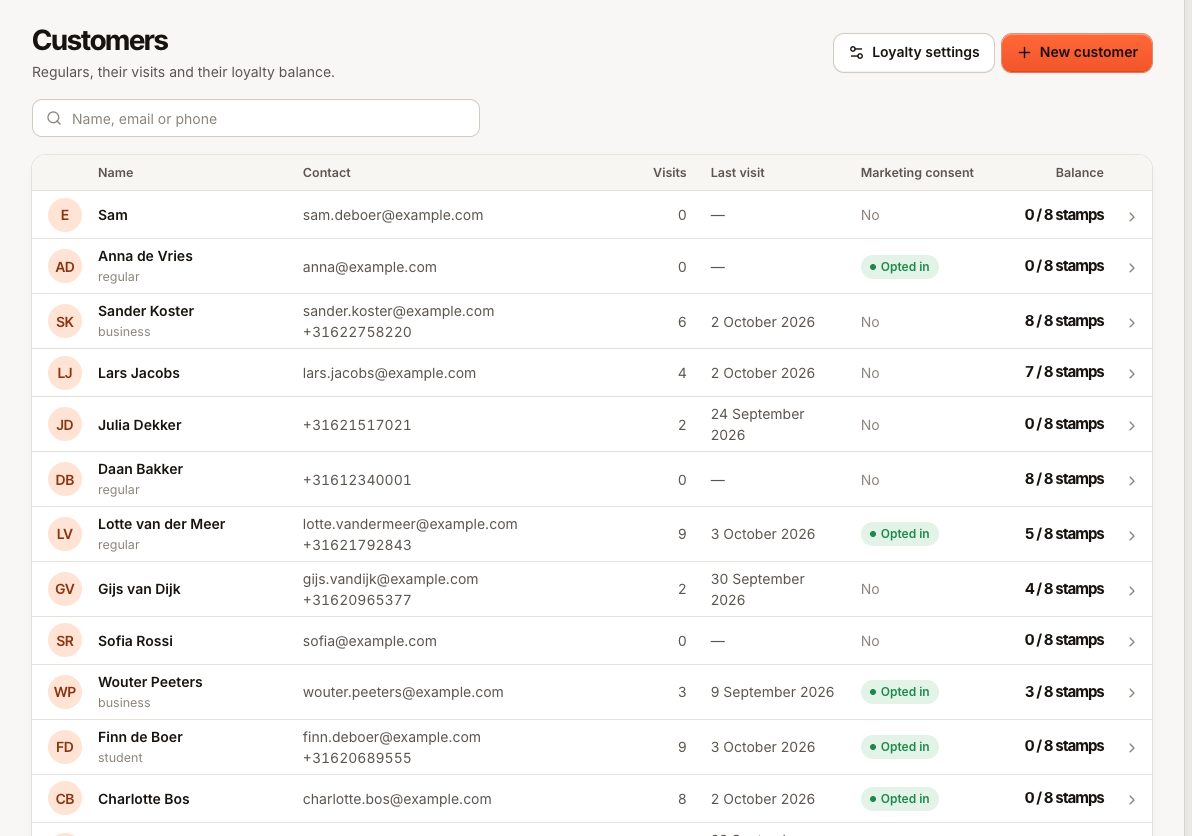
An email address or phone number can belong to only one profile in your business. If you see "Another customer already uses this email address" (CUSTOMER_EMAIL_TAKEN) or "Another customer already uses this phone number" (CUSTOMER_PHONE_TAKEN), the guest is probably already saved. Search for them, and merge the duplicate if there are two.
Staff can also add customers at the till, see What Knownbee is.
Marketing consent
The Marketing consent switch on the profile records whether the guest said yes to news and offers. Only turn it on with the guest's explicit yes. The date it was given is shown under the switch, and every change is written to the activity log.
Guests who book or order on your own pages are added to Customers by their email once they confirm it with the booking code or pay the order. A ticked news box on those pages is recorded then, never before. A phone number they type is saved on a new profile but never links them to an existing one.
Verimly only stores this consent. There is no tool to send marketing campaigns to guests. A guest who uses Knownbee can switch news from your place on or off themselves on their card.
Export a customer's data
Use this when a guest asks what you keep about them.
- Open the customer in Customers.
- Open More actions (the three dots) and choose Export data.
- A JSON file downloads, named after the profile.
The file contains the profile, the loyalty balance and its full history, the orders linked to the profile, online orders placed with the same email or phone, bookings and gift cards (with masked codes). The export is recorded in the activity log.
Delete a customer
- Open the customer in Customers.
- Open More actions and choose Delete customer.
- Confirm. "Profile and balance are removed. This can’t be undone."
What happens:
- The profile, the loyalty balance and its history are deleted.
- Orders stay in your sales and reports, but lose the name and contact details. This includes online orders placed with the customer's email or phone.
- Bookings keep their date and party size, without the name or contact details.
- Gift cards stay valid, but are no longer linked to a profile.
- The guest's own Knownbee account is not deleted. Your card disappears from it.
What the guest can do in Knownbee
A guest who uses Knownbee can manage their data without asking you:
- On a card, under Your data at your place: Download my data gives the same export you can make. Leave this place followed by Leave and delete my data deletes your profile of them, exactly as if you had deleted it.
- In Profile: Download all my data covers the account and every card. Delete account deletes the account and every card, after a confirmation code.
There is no way to unlink a guest from your place and keep the profile. Every customer is a Knownbee customer, so the same email or phone would bring the card straight back.
Common questions
Can I undo a deletion?
No. Add the guest again as a new customer. Their previous balance and history cannot be restored.
Does deleting a customer change my reports?
No. The orders and their totals stay. Only the link to the person and their contact details are removed.
Can staff sign a guest in to Knownbee or accept the terms for them?
No. The guest signs in on their own phone and accepts Knownbee's terms themselves. Saving a profile never accepts anything on their behalf.
If something goes wrong
- The export or delete option is missing: you need Manage customers. Ask the owner to check your role in Roles and permissions.
- The guest says their card is not in Knownbee: check the email or phone on the profile against the one they sign in with. See Points, stamps or a member code are not working.
- Two profiles for one guest: see Merge duplicate customer profiles.